CSV, a Truly Evil Format
Why text-based data formats break at scale, and the binary formats that replaced them
Reading time: ~18 minutes
You exported a table to CSV. Twelve columns, maybe two million rows. You emailed it to someone. They opened it in Excel. Half the zip codes are gone — Excel decided they were numbers and stripped the leading zeros. A column of timestamps now says "Jan" through "Dec" because Excel auto-formatted them. Three fields that contained commas have silently merged with the next column, shifting every row after row 847 by one cell to the right.
Nobody noticed for two weeks.
This is not a bug. This is CSV working exactly as designed — which is to say, not designed at all.
The format that isn't one
CSV has no specification. I need you to sit with that for a moment. The most widely used data exchange format in the history of computing has no formal specification.
Yes, there's RFC 4180. Published in 2005, thirty years after CSV was already everywhere. It's an "informational" RFC, not a standard. It says fields should be separated by commas and optionally quoted with double quotes. It says nothing about encoding, nothing about types, nothing about null values, nothing about nested data, nothing about escaping beyond the most basic case.
In practice, every implementation interprets CSV differently. Excel uses commas in the US and semicolons in Europe (because commas are decimal separators in German-speaking countries, and someone at Microsoft decided that was CSV's problem to solve). Some tools use \N for null. Some use an empty string. Some use the literal word NULL. There is no way to distinguish between an empty string and a missing value without prior agreement between writer and reader — agreement that doesn't live in the file.
There's no header for types. A column that looks like 12345 could be an integer, a zip code, a product SKU, or the string "12345". The reader guesses. The reader guesses wrong.
And the performance. Every value is a string. Every number must be parsed character by character. 3.14159265358979 — that's 16 bytes of ASCII that your CPU needs to convert to an 8-byte double before it can do anything useful with it. Multiply that by a billion rows, and you're spending more time parsing than computing.
JSON: better, but not by enough
JSON at least has a spec. It has types — sort of. You get strings, numbers, booleans, null, arrays, and objects. That's more than CSV. But JSON has its own pathologies.
Numbers in JSON are arbitrary precision and untyped. 12 and 12.0 and 12.000 are all valid. Is that an int32, an int64, a float64? The spec doesn't say. Your parser decides. Different parsers in different languages make different decisions, and you discover this at 2 AM when a downstream system is producing wrong results because it rounded a 64-bit integer to a float somewhere in the pipeline.
There's no date type. Every date is a string, and everyone picks a different format. ISO 8601 if you're lucky. MM/DD/YYYY if you're American. DD/MM/YYYY if you're European. YYYY年MM月DD日 if you're Japanese. The file doesn't tell you which one it used.
And then there's the size. JSON is verbose. {"temperature": 72.5} is 22 bytes to encode a single floating-point value. In IEEE 754 binary, that's 8 bytes. In a columnar binary format, it's 8 bytes with no field name repeated, because the schema is stored once. Multiply by a hundred million rows and you're looking at gigabytes of wasted disk and network bandwidth on curly braces and quotation marks.
JSON also doesn't stream well. To find the last record, you have to parse the entire file. There are no offsets, no indexes, no way to seek to row 50,000 without reading all 49,999 before it. NDJSON (newline-delimited JSON) helps here, but now you've lost the schema — each line is a standalone object and there's no guarantee they share the same fields.
What binary buys you
The problems with text formats come down to three things: no types, no schema, and no structure.
Binary formats fix all three.
Types are encoded, not inferred. An int64 is always 8 bytes, always in a known byte order, always an integer. No parsing. Your CPU reads the bytes and they're already the thing.
The schema is embedded. Column names, types, nullability, compression codecs — all stored in the file's metadata. The reader doesn't guess. The reader doesn't need a separate data dictionary that someone forgot to update.
The data has structure. Binary formats know about rows and columns. They know how to split a file into independently-readable chunks. They know which bytes belong to which column. This means you can skip columns you don't need, read ranges of rows without scanning everything, and decompress only the parts you're actually going to use.
And they compress dramatically better than text. A column of 64-bit timestamps where each value is within a few seconds of the previous one? Delta-encode it (store only the differences), then run-length encode the deltas. A billion timestamps might compress to a few megabytes. Try that with CSV.
The split: rows vs columns
Here's where it gets interesting.
You have a table: 10 columns, a million rows. You can serialize it two ways.
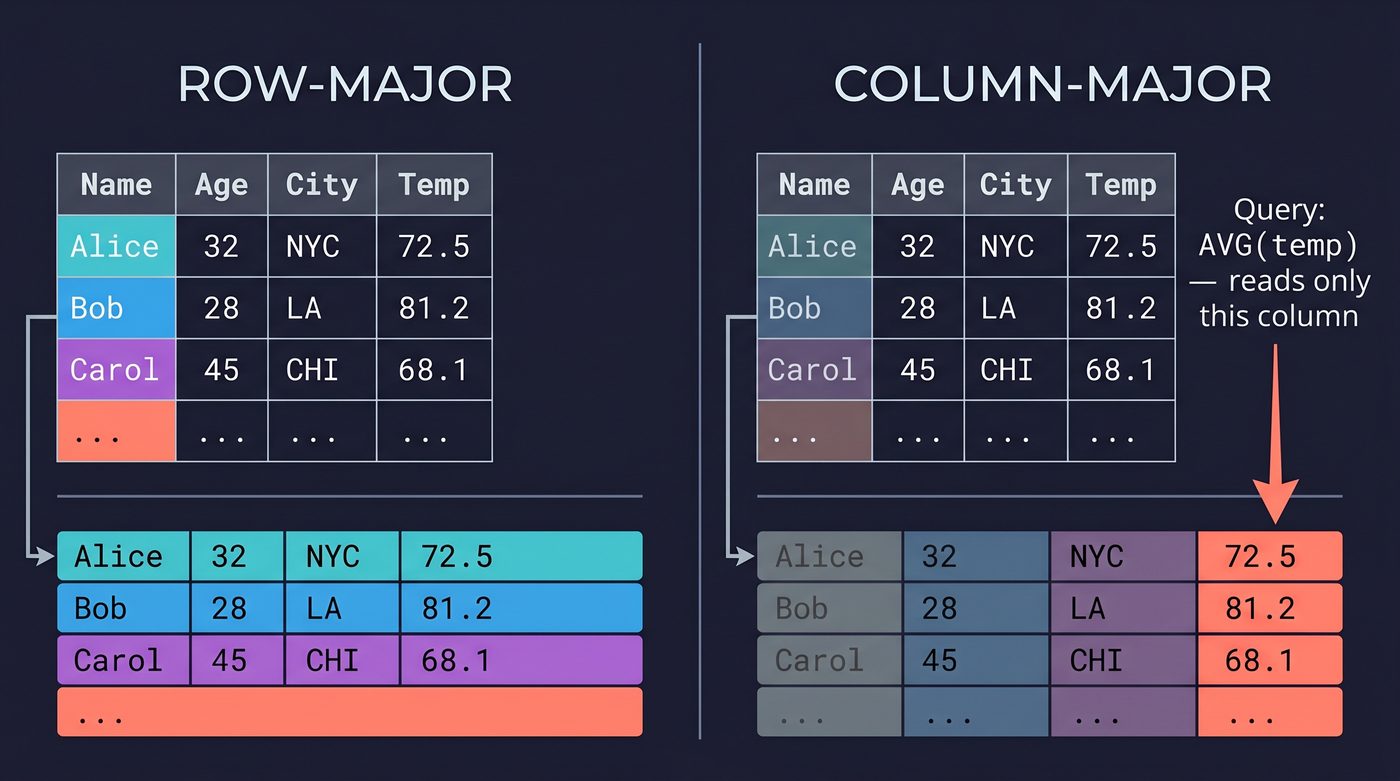
Row-major: write all 10 values of row 1, then all 10 values of row 2, then all 10 of row 3. This is how you think about data. It's how databases write it. It's how your application produces records.
Column-major: write all million values of column 1, then all million values of column 2, then all million of column 3. This feels wrong. It is also, for many workloads, dramatically faster.
Why? Because of what you're actually doing with the data.
If you're writing records one at a time — inserts into a log, events from a sensor, messages from Kafka — row-major wins. Each record arrives whole, and you want to append it as a unit.
If you're reading data for analytics — "give me the average temperature for the last 30 days" — column-major wins. You only need one column out of ten. In a row-major file, you read all ten columns to get the one you want. In a column-major file, you skip directly to the temperature column and ignore the other nine. That's a 10× reduction in I/O before you've done anything clever.
Column-major also compresses better. Values in the same column tend to be similar — they're the same type, the same range, often nearly identical to their neighbors. A column of country codes is mostly "US" repeated. A column of booleans is mostly false. A column of timestamps is monotonically increasing. These patterns are compression gold. Row-major data mixes types — a string next to a float next to a boolean — and the compressor can't exploit the redundancy.
This is the fundamental split in binary data formats. Avro chose row-major. Parquet chose column-major. Arrow chose column-major. The choice determines everything that follows.
Parquet: columnar on disk
Apache Parquet is the format your analytics engine wants you to use. Spark, DuckDB, Polars, BigQuery, Redshift, Athena — they all read Parquet natively, and they all perform dramatically better on Parquet than on CSV or JSON.
The structure is a file with a footer.
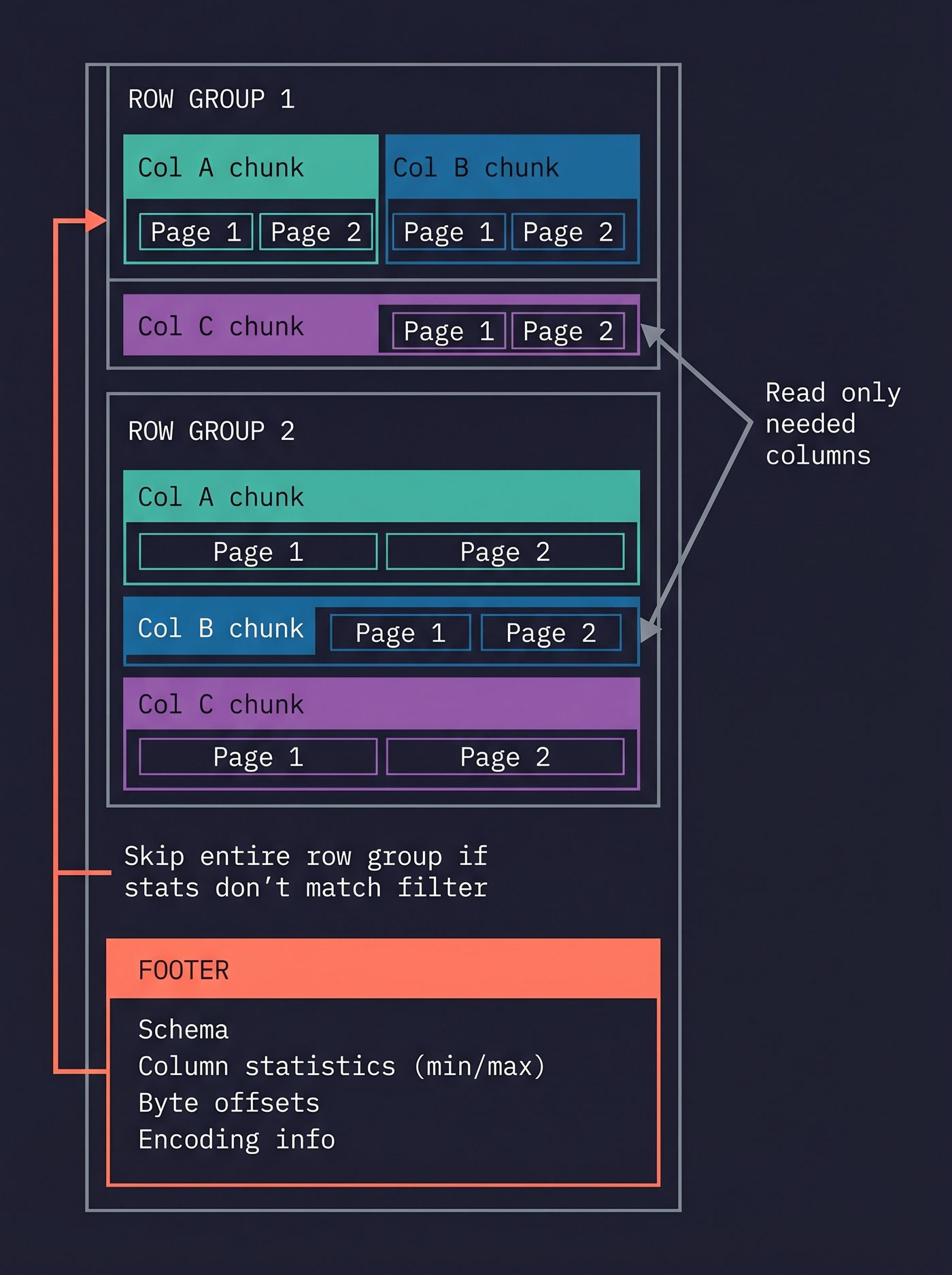
A Parquet file is divided into row groups — horizontal slices of the data, each containing some number of rows (typically 50K to 1M). Within each row group, each column is stored as a column chunk. Each column chunk is divided into pages — the unit of compression and encoding.
The footer, at the end of the file, contains the full schema (column names, types, nesting), the file-level statistics (min/max per column per row group), and the byte offsets of every column chunk and page.
How a reader actually opens a Parquet file
The read path is backwards. Literally.
A Parquet file starts and ends with the magic bytes PAR1 — four ASCII bytes that tell the reader "this is Parquet." But the reader doesn't start at the beginning. It starts at the end.
The last 4 bytes of the file are PAR1 (the trailing magic). The 4 bytes before that are a little-endian int32: the length of the footer in bytes. The reader reads those 8 bytes, now knows exactly where the footer begins, and issues a single seek to read the entire footer.
The footer is a Thrift-encoded structure containing the full schema, every row group's location and statistics, every column chunk's byte offset, and the encoding/compression metadata for every page. One read, and the reader has a complete map of the file.
From here, reading a single column is surgical. The reader finds the column's chunk offset in each row group, seeks directly to those byte positions, decompresses the pages, and returns the values. It never touches the other columns. It never scans sequentially. It's random access into a structured binary layout, guided by the footer's index.
Compare this to CSV: to read column 7 of row 500,000, you parse every byte of every row before it, counting commas, handling quotes, guessing types. In Parquet, you seek to a byte offset and decompress. The difference is not incremental. It's architectural.
This structure means a reader can do something CSV can't even imagine: predicate pushdown. If you say "WHERE temperature > 100", the reader checks the footer's per-row-group statistics. If the max temperature in row group 7 is 85, it skips the entire row group without reading a single data byte. For selective queries on large files, this can skip 90%+ of the data.
Encodings
Parquet doesn't just store raw values. It encodes them.
Dictionary encoding. If a column has low cardinality — say, country codes with 200 distinct values across a billion rows — Parquet builds a dictionary of the distinct values and stores each row as an index into the dictionary. Instead of storing "United States" a billion times (13 bytes each), it stores the number 42 a billion times (maybe 1 byte each). This is automatic. The writer decides per-page whether dictionary encoding is worthwhile.
Run-length encoding (RLE). If you have 10,000 consecutive rows where country = "US", Parquet stores ("US", 10000) instead of 10,000 copies of "US". Combined with dictionary encoding, this becomes (42, 10000) — a few bytes for ten thousand rows.
Delta encoding. For timestamps, integers, and other ordered data, Parquet can store the first value and then the differences. If your timestamps are one second apart, the deltas are all 1, and RLE collapses the whole column to nearly nothing.
Bit packing. If your integers all fit in 3 bits, Parquet packs them 3 bits at a time instead of wasting a full byte or four. The bit width is stored in the page header.
These encodings compose. A typical column might be dictionary-encoded, delta-encoded within the dictionary indices, and then Snappy-compressed on top. The result is often 10–50× smaller than the same data in CSV.
Nested data
Parquet handles nested data — arrays, maps, structs — using the Dremel encoding from the original Google paper. Each nested field gets two auxiliary columns: a repetition level (where in the nesting does this value repeat?) and a definition level (how many levels of the hierarchy are defined at this point?). It's clever and it's also the part of Parquet that makes people's eyes glaze over. The point is: Parquet can store a JSON-like structure column-by-column, without flattening, and still get columnar compression benefits.
The tradeoff
Parquet is terrible for writes. Every write produces a new row group (or a new file), and the footer must be rewritten. Appending a single row to a Parquet file means rewriting the footer at minimum, and possibly an entire row group. Parquet is a write-once, read-many format. It's for data that has landed and been organized. It's not for streaming.
Avro: row-oriented on the wire
Apache Avro chose the other side of the split. Row-major. And it chose it for a reason: Avro was built for data in motion.
Where Parquet is for querying settled data, Avro is for passing records between systems. Kafka messages. RPC payloads. Event logs. Data that arrives one record at a time and needs to be serialized fast, transmitted small, and deserialized without knowing in advance what version of the schema the writer used.
Schema evolution
This is Avro's killer feature.
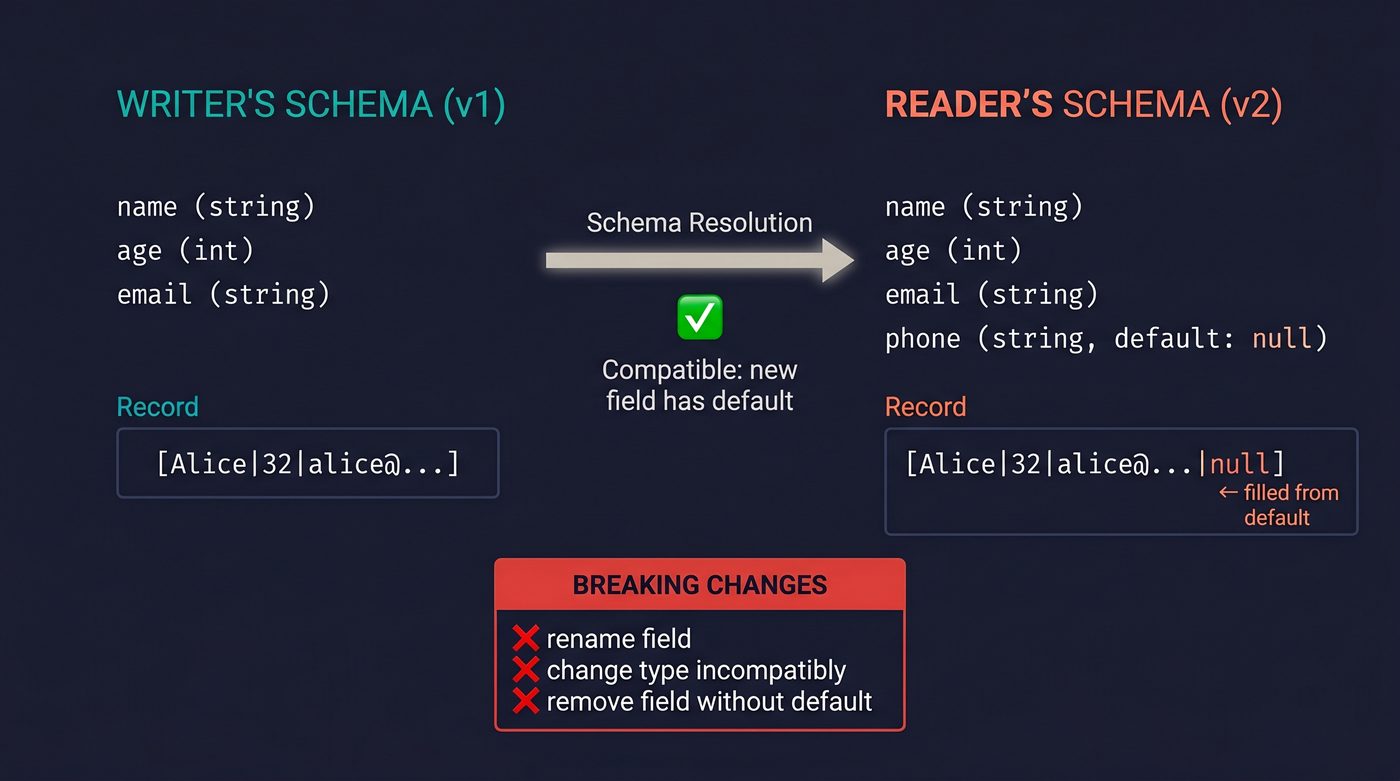
Every Avro file (or every Kafka topic) carries its schema — the full description of every field, its type, its default value, its documentation. But here's the trick: the writer's schema and the reader's schema don't have to be the same.
Say you wrote records with fields (name, age, email) last year. This year, you added a phone field with a default value of null. Readers using the old schema still work — they ignore phone. Readers using the new schema still read old records — they fill in the default for phone. No migration. No versioning headache. No breaking change.
Avro's schema resolution rules define exactly which changes are compatible (adding a field with a default, removing a field, widening an int to a long) and which are breaking (renaming a field, changing a type incompatibly). This is the kind of thing you'd have to build yourself on top of JSON — and invariably get wrong.
The encoding
Avro's binary encoding is compact. No field names, no delimiters, no framing beyond what's needed. A record is just the values back to back, in schema order.
Integers use variable-length zigzag encoding, and it's worth understanding why both halves of that phrase matter.
Variable-length encoding means small values take fewer bytes. The number 1 takes 1 byte. The number 1,000,000 takes 3 bytes. The number 2,147,483,647 takes 5 bytes. You pay for the magnitude of the value, not the fixed width of the type. Most real-world integers are small — ages, counts, status codes, array lengths — so most integers cost 1 or 2 bytes instead of the 4 you'd burn in a fixed-width int32.
But variable-length encoding has a problem with negative numbers. In a naive scheme, -1 would be encoded the same as 4,294,967,295 (its unsigned representation), costing 5 bytes for the most common negative value. Zigzag encoding fixes this by interleaving positives and negatives: 0 → 0, -1 → 1, 1 → 2, -2 → 3, 2 → 4, and so on. The formula is (n << 1) ^ (n >> 31) for 32-bit integers. Small negative numbers map to small positive numbers, so -1 costs 1 byte, not 5. It's a one-line transform that saves significant space when your data has small negative values — which includes virtually every delta-encoded column.
Strings are a length prefix (itself zigzag-encoded) followed by raw UTF-8 bytes. There's no parsing ambiguity because the schema tells the reader exactly what to expect and in what order.
An Avro file is a sequence of blocks, each containing some number of serialized records. Each block starts with the count of records and the byte length, so a reader can skip blocks without deserializing them. Blocks are individually compressed (typically Snappy or Deflate).
The tradeoff
Avro is bad for analytics. If you want the average of one column across a billion records, you have to deserialize every field of every record to get to the one you care about. There's no column skipping, no predicate pushdown, no per-column statistics. Avro reads all the data, every time.
That's fine. Avro isn't for analytics. It's for moving records from A to B, fast, with schema safety.
Arrow: columnar in memory
Apache Arrow is the weird one. It's not a file format. It's a memory layout. And it exists because one person got fed up.
In 2013, Wes McKinney — the creator of Pandas — left the project. By 2015, he was writing publicly about everything wrong with it. His blog post "10 Things I Hate About pandas" was a self-inflicted autopsy: Pandas was slow, memory-hungry, and its internal data representation was a mess of Python objects and NumPy arrays duct-taped together. But the deepest problem wasn't Pandas-specific. It was that every data system — Pandas, R, Spark, Impala, Drill — had its own in-memory format, and moving data between any two of them meant serializing, copying, and deserializing. The same data got rebuilt from scratch every time it crossed a library boundary.
McKinney's insight was that the problem wasn't any single library's format. The problem was that there were many formats. If every system agreed on one in-memory columnar layout, you could pass a pointer instead of copying bytes. Zero serialization. Zero copies.
He started the Arrow project in 2015 with Jacques Nadeau (the lead of Apache Drill) and engineers from Cloudera, Databricks, and the R community. It entered the Apache Incubator in early 2016 and graduated that same year — unusually fast, because the consortium backing it was broad and the specification was already working. The bet was simple: don't build another analytics engine, build the memory format that all analytics engines share. Let Pandas, Spark, R, Julia, DuckDB, and every future tool agree on how columnar data sits in RAM, and eliminate the conversion tax forever.
It worked. Arrow defines how columnar data should be arranged in RAM — the byte alignment, the null bitmaps, the offset buffers for variable-length data, the way nested types are represented. It's a specification for the shape of memory, not the shape of files.
Even Pandas came around — slowly, then all at once. Version 1.5.0 (September 2022) introduced ArrowDtype as an experimental extension. Version 2.0.0 (April 2023) made it official: pass dtype_backend="pyarrow" to any I/O function and the entire DataFrame is Arrow-backed — no NumPy anywhere. Polars, which launched after Arrow existed, never used anything else. DuckDB can read a Polars DataFrame without copying a single byte. The lingua franca bet paid off.
Arrow IPC and Flight
Arrow does have a serialization format — Arrow IPC (Inter-Process Communication). It's essentially Arrow's in-memory layout written to a byte stream, with metadata headers. Because the on-wire format is identical to the in-memory format, deserialization is a memcpy (or, if the data is already in a shared memory region, just a pointer cast). No parsing. No type conversion. The bytes on disk are the bytes in RAM.
Arrow Flight takes this further — it's a gRPC-based protocol for streaming Arrow record batches over the network. It's what you'd use if you wanted to ship columnar data between services at wire speed, without the overhead of JSON or even Avro serialization.
The Parquet–Arrow connection
Parquet and Arrow are siblings. They're both Apache projects, they share developers, and they were designed to complement each other. The typical workflow: data is stored on disk in Parquet (compressed, compact, queryable), and loaded into memory as Arrow (uncompressed, aligned, zero-copy). The pyarrow library can read a Parquet file directly into Arrow memory without an intermediate representation. It's the fastest path from disk to computation.
The tradeoff
Arrow is uncompressed. That's by design — compression interferes with random access and vectorized computation. But it means Arrow data in memory is much larger than the same data in Parquet on disk. A 100 MB Parquet file might expand to 2 GB in Arrow memory. You're trading space for speed, and you're trading it in the most expensive tier of the storage hierarchy.
When to use which
I said this wouldn't be a spec-sheet comparison, but you need the decision matrix. Here it is:
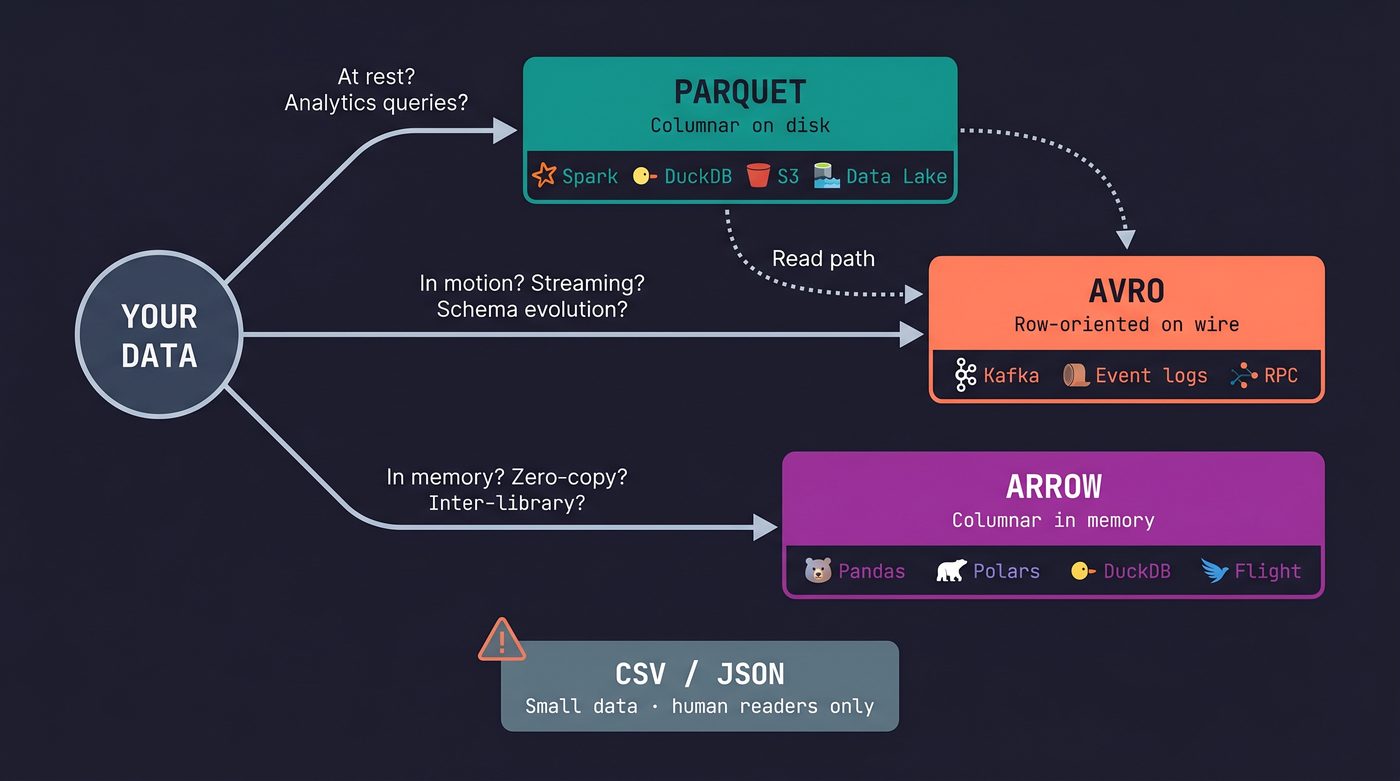
Use Parquet when: your data has landed and you need to query it. Data lakes, analytics warehouses, anything that lives on S3 or HDFS and gets read by Spark/DuckDB/Polars/Athena. Write once, read many. If you're exporting data for someone else to analyze, Parquet is the answer.
Use Avro when: your data is in motion. Kafka messages, event logs, inter-service payloads, any situation where records arrive one at a time and schema compatibility between producer and consumer matters. Avro is the wire format.
Use Arrow when: your data is in memory and you need to operate on it. DataFrames, in-process analytics, inter-library handoffs. Arrow is the memory format. You don't typically "choose" Arrow — the libraries you use choose it for you, and you benefit from zero-copy interop.
Use CSV when: you're sending a small table to someone who will open it in Excel. That's it. That's the only use case. And even then, consider whether a Parquet file and a link to DuckDB would serve them better.
Use JSON when: you're building an API response for a web client, or you need a human-readable config file. JSON is fine for small, typed, schema-stable data. It stops being fine at around 100 MB.
The real lesson
CSV has survived for fifty years not because it's good but because it's legible. You can open it in Notepad. You can cat it. You can eyeball the data without installing anything. That's a real advantage, and I don't dismiss it.
But legibility is a feature for humans, and at scale, the machine is doing the reading. The machine doesn't care about legibility. The machine cares about knowing the types without guessing, skipping the columns it doesn't need, decompressing only the row groups that match the filter, and fitting the data in cache because the encoding is compact.
Every hour spent debugging a CSV parsing bug — the quoting, the encoding, the missing headers, the shifted columns, the mangled zip codes — is an hour you didn't spend on the problem you were actually trying to solve.
The formats exist. They're free. They're fast. Use them.
I'm writing a book about what makes developers irreplaceable in the age of AI. Join the early access list →
Naz Quadri has mass-replaced more commas-inside-quotes than any human should have to. He blogs at nazquadri.com. Rabbit holes all the way down 🐇🕳️.
Further Reading
- Apache Parquet Format Specification — the full file-format spec including Dremel encoding, page structure, and statistics.
- Apache Avro Specification — the schema evolution rules, encoding details, and file container format.
- Apache Arrow Columnar Format — the memory layout spec, null bitmaps, buffer alignment, and type system.
- Dremel: Interactive Analysis of Web-Scale Datasets — the Google paper that invented the nested columnar encoding Parquet uses.
- RFC 4180: Common Format and MIME Type for CSV Files — the "standard" that standardized nothing. Read it and weep.
- 10 Things I Hate About pandas — Wes McKinney's 2017 post on Pandas internals, the serialization tax, and why Arrow was necessary.
- The problem with CSV — Chris Warrick's detailed catalogue of CSV ambiguities and implementation divergences.